
UX/UI DESIGN
MetroBus Transit Web-App
The goal was to create a web-first transit interface that reduces trip planning friction and improves commuter confidence when navigating the bus system.
Lead UX Designer
10 Weeks
JHB Metrobus
Concept
Lead UX Designer
10 Weeks
JHB Metrobus
Concept
Overview
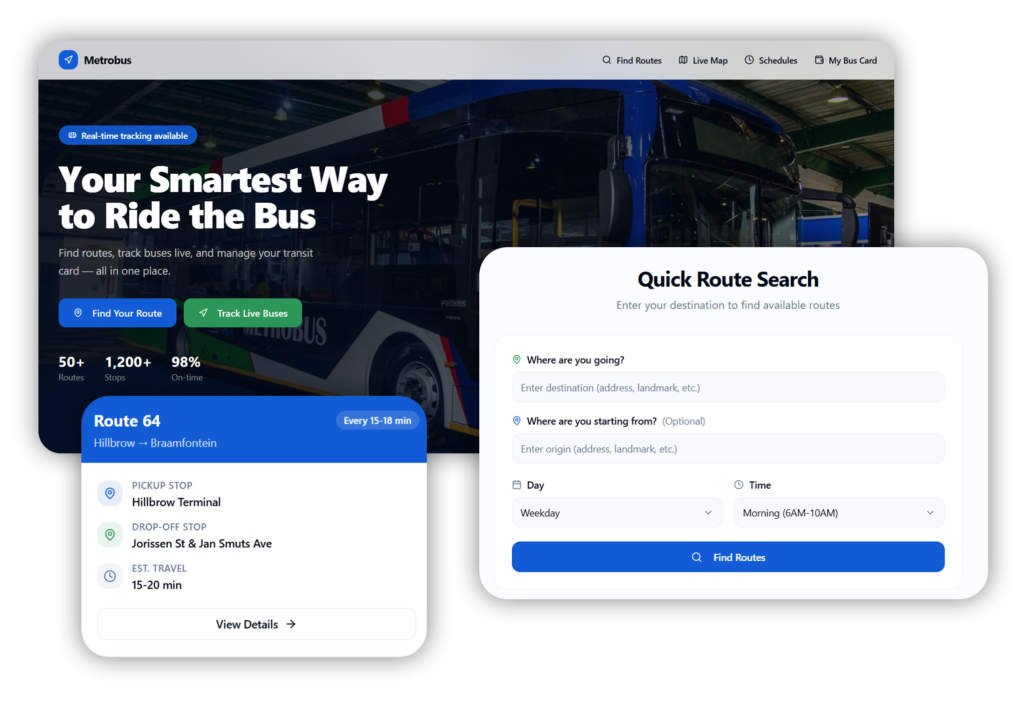
Public transit systems are essential for daily mobility, yet their digital interfaces often create unnecessary complexity. Many transit websites rely heavily on static route lists and PDF schedules, forcing riders to manually determine which bus serves their destination.
This project explores how a smart route discovery platform could simplify the experience for commuters by enabling destination-based search, real-time bus tracking, and integrated transit card management.
User Research
Prompt Engineering
Figma
Prototyping
Generative AI
Lovable
User Persona
ChatGPT
Problem Statement
How might we help commuters confidently navigate the MetroBus system by providing clear route discovery, real-time bus information, and a simplified web-friendly interface?
User Research
To understand how commuters interact with transit information, the design process considered common behaviors and frustrations experienced by bus riders.
Research Methods
- Interviews with daily commuters
- Observational research at bus stops
- Review of common transit website usability issues
- Competitive analysis of popular transit platforms
Many commuters rely on informal methods to understand routes, such as asking other riders or memorizing bus stops.
Existing digital tools often prioritize route numbers instead of user destinations, which does not align with how people naturally plan trips.
Key Findings
76%
of commuters struggle to identify which bus route serves their destination. The current Metrobus site requires riders to browse route numbers rather than search for their destination.
63%
of riders want real-time bus tracking. Without live updates, commuters often arrive too early at stops or miss buses due to schedule uncertainty.
36 min
average time first-time riders spend figuring out which bus to take. Understanding routes, stops, and travel direction can be confusing without a clear route discovery tool.
71%
of commuters prefer managing transit cards online. Long queues at stations for card top-ups create frustration, especially during peak commuting hours.
76%
of commuters struggle to identify which bus route serves their destination. The current Metrobus site requires riders to browse route numbers rather than search for their destination.
63%
of riders want real-time bus tracking. Without live updates, commuters often arrive too early at stops or miss buses due to schedule uncertainty.
36 min
average time first-time riders spend figuring out which bus to take. Understanding routes, stops, and travel direction can be confusing without a clear route discovery tool.
67%
of commuters prefer managing transit cards online. Long queues at stations for card top-ups create frustration, especially during peak commuting hours.
User Personas

Thabo Mokoena
35 • Office Administrator
“Every morning I need to get to Sandton before 8am. Sometimes I arrive at the stop and the bus already passed or is delayed, and I have no way of knowing where it is.”
Goals
- Find the fastest route to work without browsing multiple bus routes
- Know exactly when the next bus will arrive
- Track buses in real time to avoid long waiting times
Pain Points
- Hard to know which bus route goes to his destination
- Bus schedules are difficult to interpret online
- No easy way to see if a bus is delayed or already passed

Lerato Nkosi
22 • University Student
“I recently moved to the city for university. The bus system is confusing because I don’t know which routes pass near campus.”
Goals
- Quickly discover buses that go near her destination
- Easily check bus schedules before leaving home
- Top up her bus card without standing in long queues
Pain Points
- Route numbers are confusing for first-time riders
- Difficult to compare routes and stops online
- Has to queue at stations to load money onto her bus card
Key Interface Features
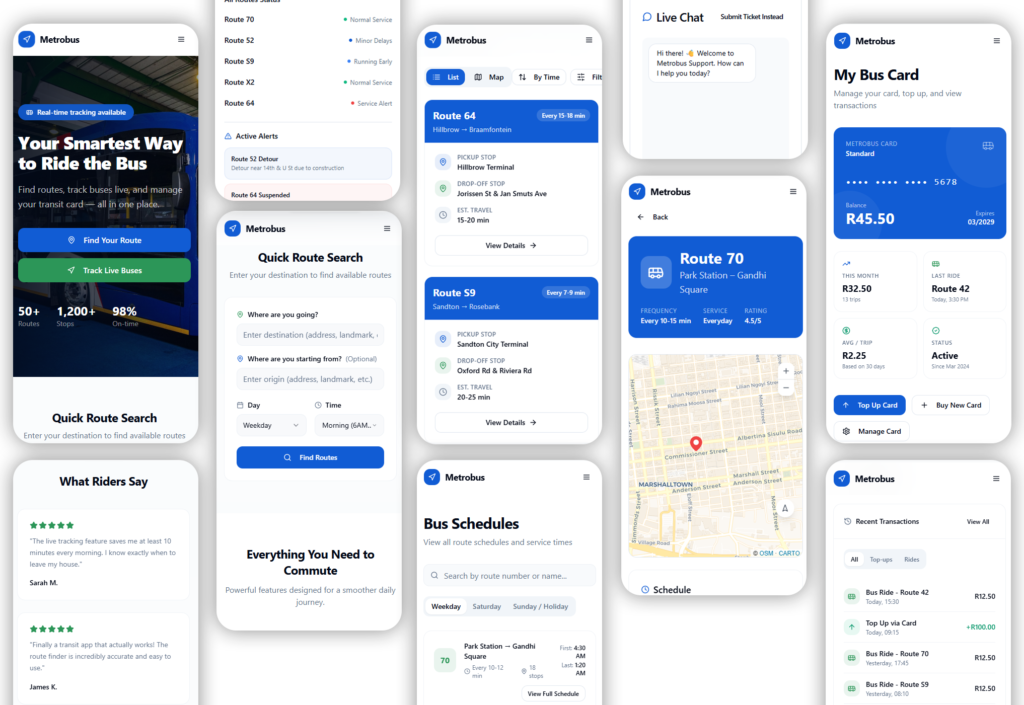
Smart Route Search
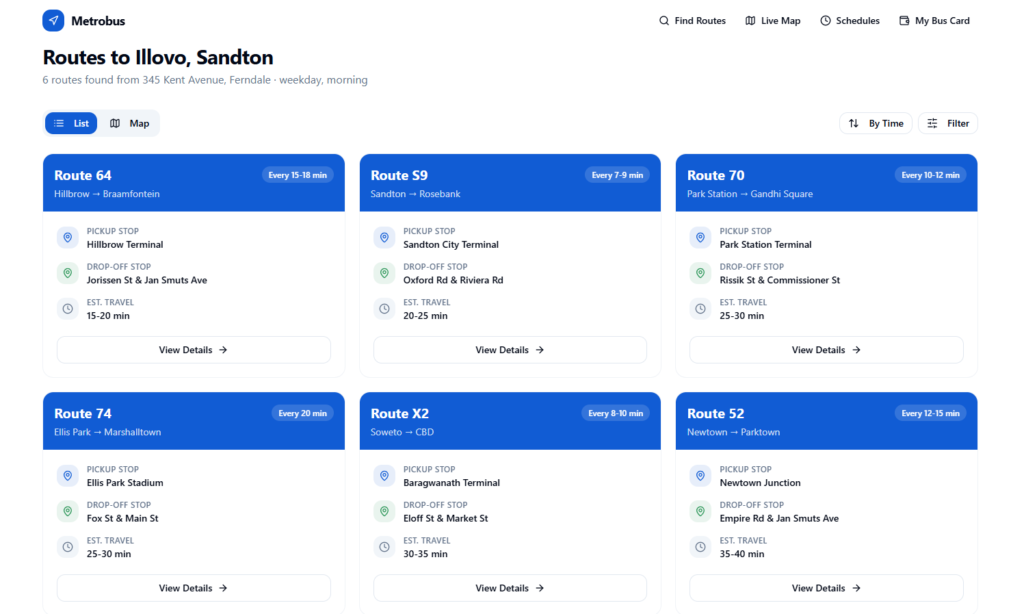
Many transit websites require users to browse long route lists before finding which bus serves their destination. This can be confusing and time-consuming, especially for new riders.
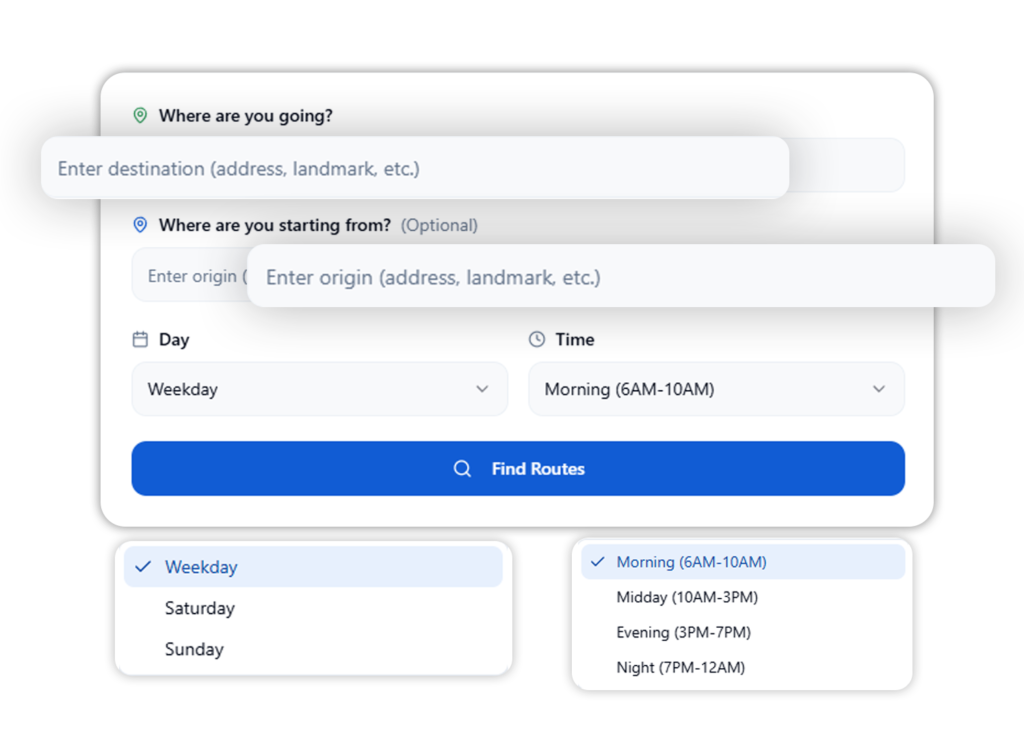
The Smart Route Search simplifies this process by allowing users to enter key trip details:
Destination
Starting point
Day of travel
Time of day
The system then generates the most relevant routes based on the user’s input. This reduces cognitive effort and helps commuters quickly identify the best bus without needing to understand route numbers or complex schedules.
Route Results & Comparison
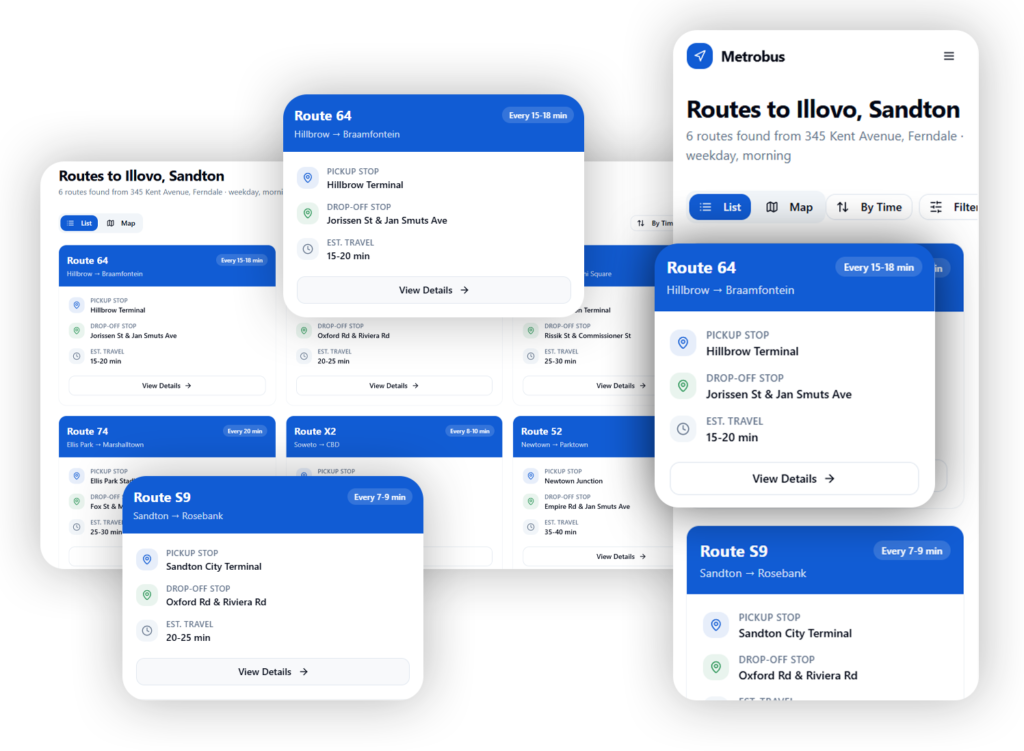
After searching for a trip, users need a quick way to evaluate available route options. Instead of overwhelming users with complex schedules, the platform presents routes in simple, easy-to-scan cards.
Each route card highlights key trip information:
Route number
Pickup stop
Drop-off stop
Estimated travel time
Bus frequency
This layout allows commuters to quickly compare route options and choose the one that best fits their travel needs.
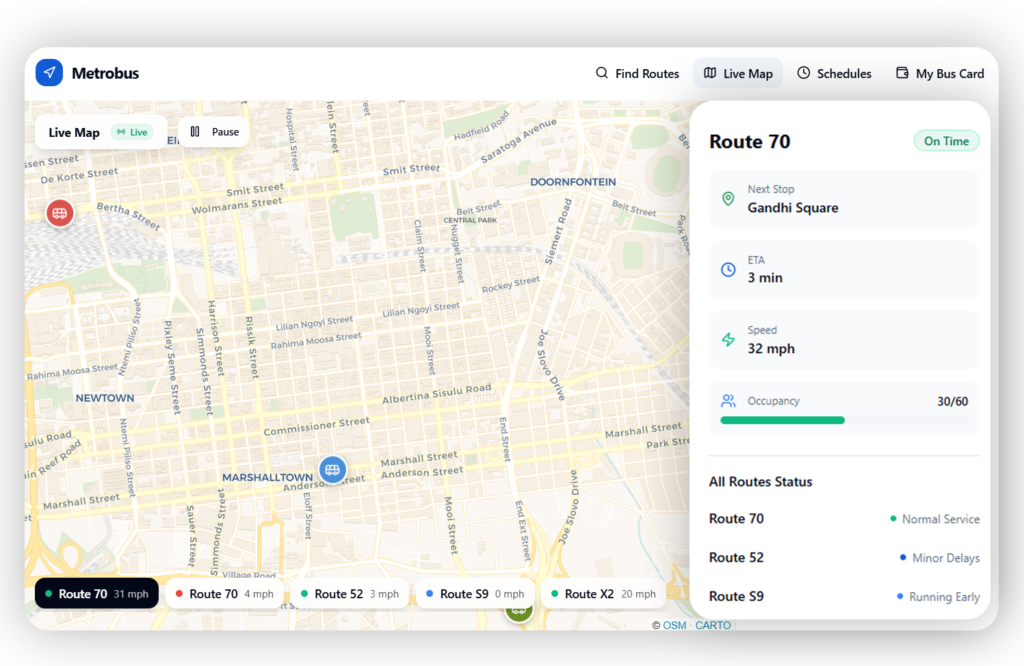
Live Bus Tracking
One of the biggest frustrations for commuters is not knowing where their bus is. Schedules alone do not always reflect real-world conditions such as traffic or delays.
The Live Tracking feature allows riders to see buses moving in real time on a map. Users can view:
Current bus location
Estimated arrival time (ETA)
Bus speed
Occupancy levels
Route service status
This gives commuters greater confidence and helps them decide when to leave for the bus stop
Bus Schedules
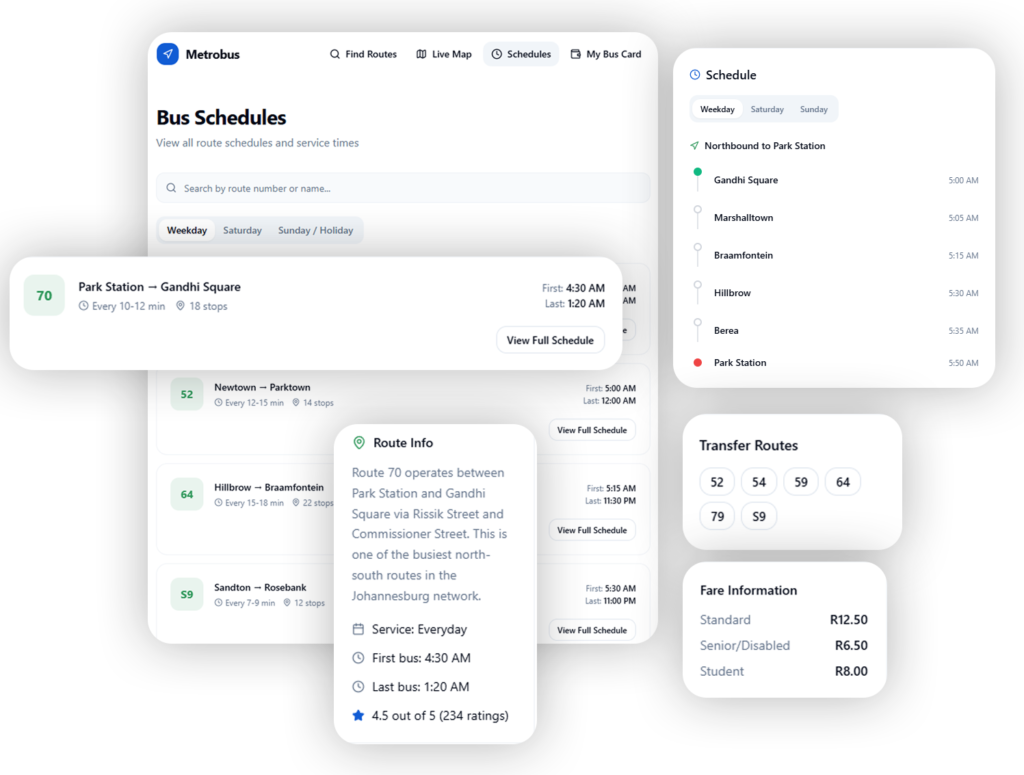
Commuters often struggle to understand bus routes, stop locations, and exact departure times. To simplify trip planning, the platform provides a structured schedule system that allows users to easily browse routes and view detailed timetable information. Users can:
View bus schedules
View fare information
Explore route maps with all stop locations
Receive service alerts such as detours & delays
By structuring route information into a clear schedule, map, and alert system, the platform helps commuters plan trips more reliably and respond quickly to service changes.
Bus Card Management
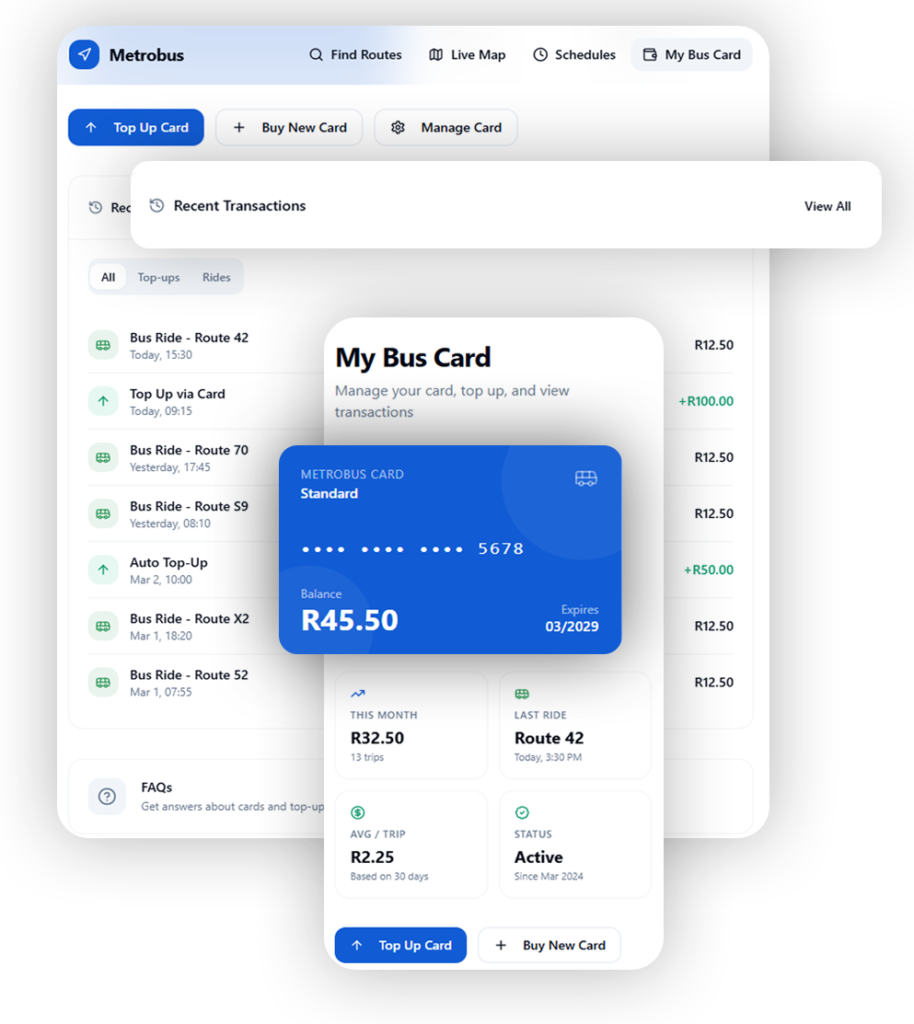
Many commuters rely on prepaid transit cards for bus payments, but managing these cards often requires visiting physical stations and waiting in queues. The platform simplifies this process by providing a digital card management dashboard where users can easily manage their MetroBus cards. Users can:
View their current card balance
Buy a new card
Top up their card in a few steps
Review transaction history and ride activity
This reduces the need for physical top-ups, minimizes queues at bus stations, and gives commuters greater control over how they manage their transit payments.
Help & Support Center
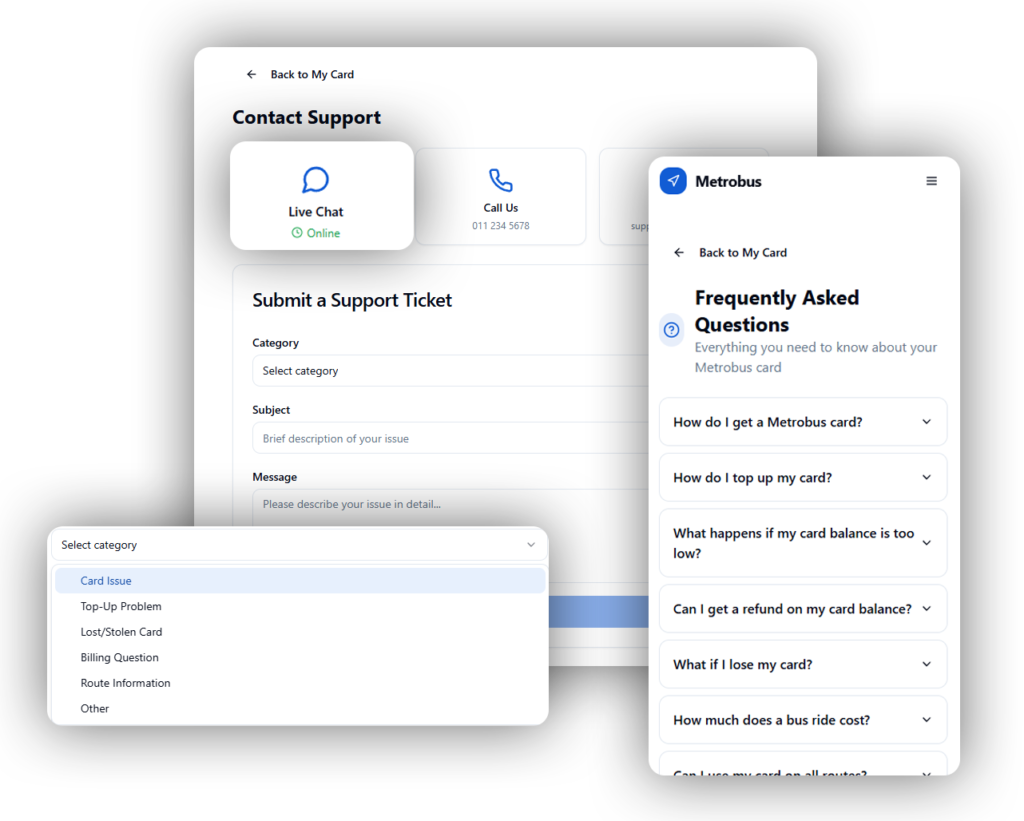
Commuters occasionally encounter issues such as lost cards, billing questions, or route confusion. Access to quick support is therefore essential. The Help & Support Center provides multiple ways for users to get assistance. Users can:
Browse FAQs
Contact support via live chat
Submit categorized support tickets
This ensures riders can quickly find answers or get help when they need it.
Usability Testing
To evaluate the effectiveness of the interface and identify usability issues, moderated usability testing sessions were conducted with participants who regularly rely on public transportation.
A task-based moderated usability testing approach was used. Participants were asked to complete realistic commuting tasks using the prototype while thinking aloud about their actions and decisions.
Methodology used:
Moderated remote usability testing
Task-based testing scenarios
Think-aloud protocol
Post-test feedback interviews
Observation and note-taking of user behavior
Participants
8 participants who regularly use public transportation were recruited. Participant mix included:
Daily commuters
Students
Workers
This group provided insights from both experienced and occasional riders.
Testing Tasks
Participants were asked to complete the following tasks:
- Find the schedule for a specific bus route
- Identify the nearest stop and next departure time
- Check if there were any service disruptions or delays
- Track a bus using the live map feature
- Top up a bus card using the digital card management system
These tasks simulated common actions commuters would perform when planning and managing their daily travel.
Key Usability Findings
Users quickly understood the route search and schedule layout, reducing time spent finding bus information.
The step-by-step card top-up flow was intuitive and easy to complete.
The live map tracking improved confidence by allowing users to see how close their bus was.
Service alerts helped users feel more informed about delays or detours.
Minor improvements were suggested around making service alerts more visually prominent and highlighting the next arriving bus more clearly.
Expected Impact
8 Min
Trip Planning Time
From 36 minutes to under 8 minutes for first-time commuters.
86%
Task Success
For finding routes, schedules, and nearby stops.
4.5
Ease of Use
Average usability rating from first-time riders.
Reflection & Learnings
One of the biggest insights from this project was that simplifying how riders discover routes can significantly improve their overall transit experience. By shifting from traditional route-number navigation to a more intuitive destination-based discovery approach, the MetroBus platform aligns more closely with how commuters naturally think about travel, focusing on where they want to go rather than memorizing specific bus routes.
Prototype Notice: This project is a functional prototype and is not connected to a live database. Any sign-up or login forms are for demonstration purposes only—you can enter any email and password to explore the interface. No information you provide will be authenticated or stored.