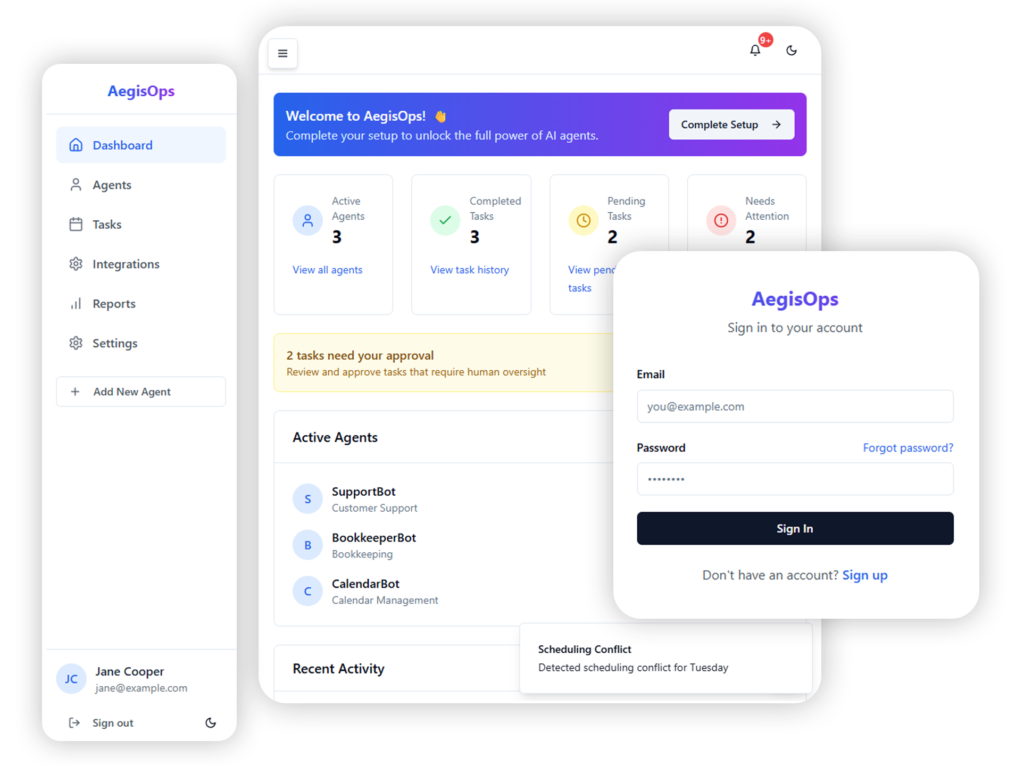
AegisOps was designed as an Agentic AI Operations Platform that allows businesses to delegate real operational tasks to specialized AI agents while maintaining human oversight and control.
Lead UX Designer
10 Weeks
JHB Metrobus
Concept
Lead UX Designer
10 Weeks
JHB Metrobus
Concept
Overview
Businesses are increasingly exploring AI automation to improve efficiency, but many existing tools require technical setup, complex workflows, or manual integrations that create friction for non-technical users.
The goal was to create a simple, transparent, and trustworthy interface where users could deploy AI agents for different business roles, connect their business tools, monitor tasks performed by agents, approve sensitive actions, and track automation performance.
The design focused on clarity, visibility, and control, ensuring that users could confidently manage AI-powered operations without feeling overwhelmed by automation.
User Research
Prompt Engineering
Figma
Prototyping
Generative AI
Lovable
User Persona
ChatGPT
Problem Statement
How might we help businesses safely delegate operational tasks to AI agents while maintaining transparency, oversight, and control over automated actions?
User Research
To understand how businesses approach automation and AI tools, research focused on three groups: founders and small business owners, operations managers, and marketing and sales teams.
Research Methods
12 interviews with small business operators using automation tools
Competitive analysis of AI automation platforms
Workflow analysis of common business operations
Observation of how teams manage tasks across tools like Slack, Gmail, and CRM systems
Key Findings
Businesses want automation but fear losing control
Users struggle with complex workflow builders
Teams want visibility into automated actions
Automation across multiple tools is difficult
User Personas
Donald Zungu
38 • Founder of a small e-commerce business
“Running my store means constantly answering emails, tracking orders, managing payments, and following up with customers. I need systems that handle these repetitive tasks so I can focus on growing the business.”
Goals
Automate repetitive operational tasks
Reduce time spent managing emails, invoices, and support requests
Monitor AI activity without constantly supervising it
Pain Points
Too many disconnected tools across the business
Automation platforms are complicated to configure
Hard to track what automated systems are doing
Sarah Daniels
43 • Operations Manager at a growing startup
“Our team handles a lot of operational work across marketing, sales, and customer support. If AI agents can handle these tasks, I need a clear way to monitor them and approve important actions.”
Goals
Improve operational efficiency using AI automation
Track agent activity and task progress in one dashboard
Maintain control over high-risk actions through approvals
Pain Points
Maintain control over high-risk actions through approvals
Lack of transparency in automated workflows
Concern about AI making decisions without human review
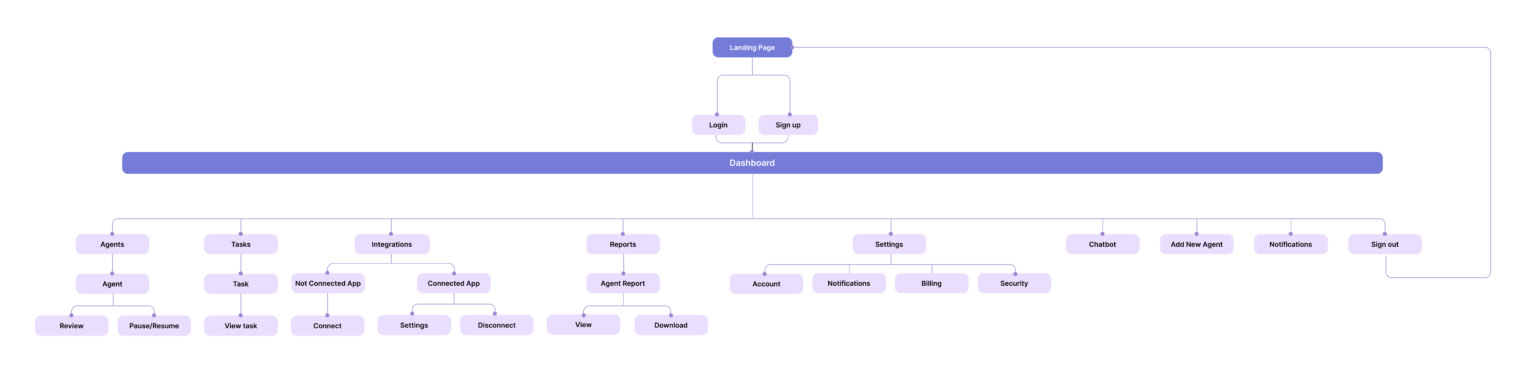
User Flow
Key Interface Features
AI Agent Management
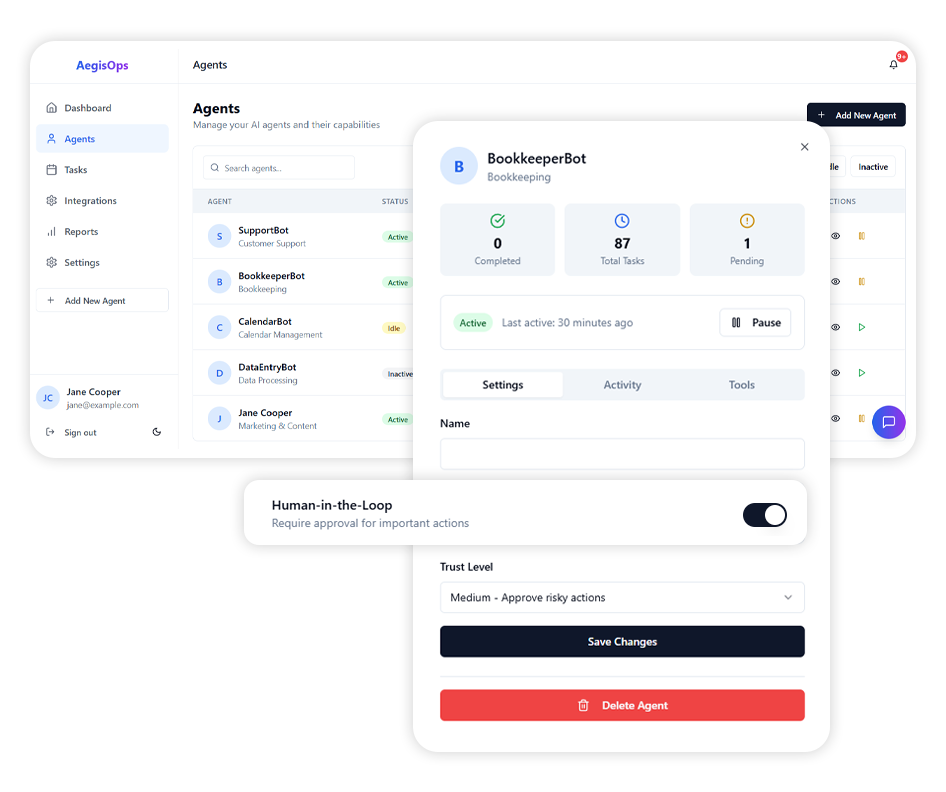
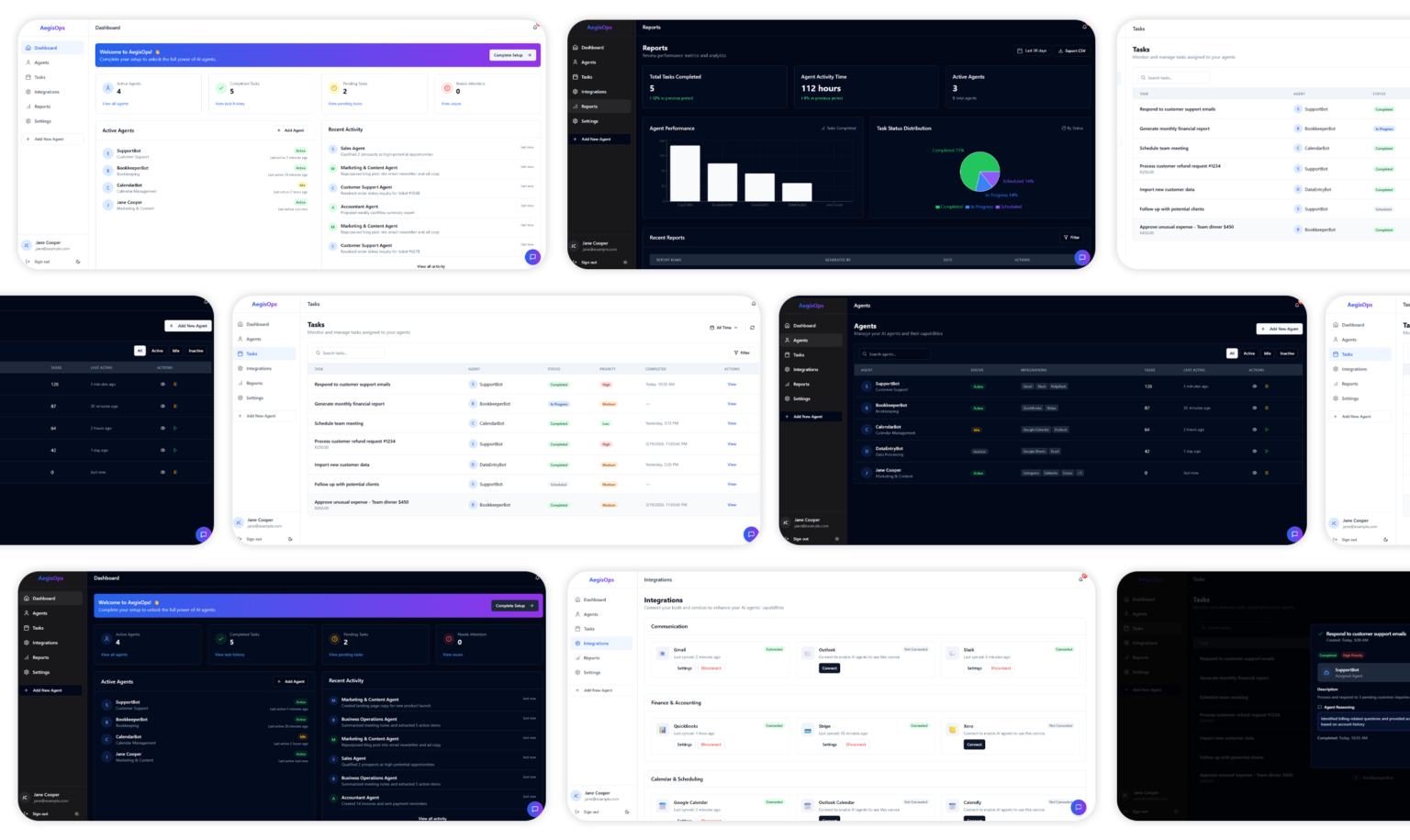
Businesses need a simple way to deploy and manage AI agents that can handle operational work across different departments. The Agent Management interface allows users to create, monitor, and control multiple AI agents from a centralized dashboard.
Users can:
Create agents for roles such as Sales, Marketing, Customer Support, and Accounting
View agent status (Active, Idle, or Inactive)
Monitor task volumes and last activity
Pause or delete agents when needed
This allows organizations to manage their AI workforce efficiently while maintaining visibility over agent performance.
Guided Agent Creation
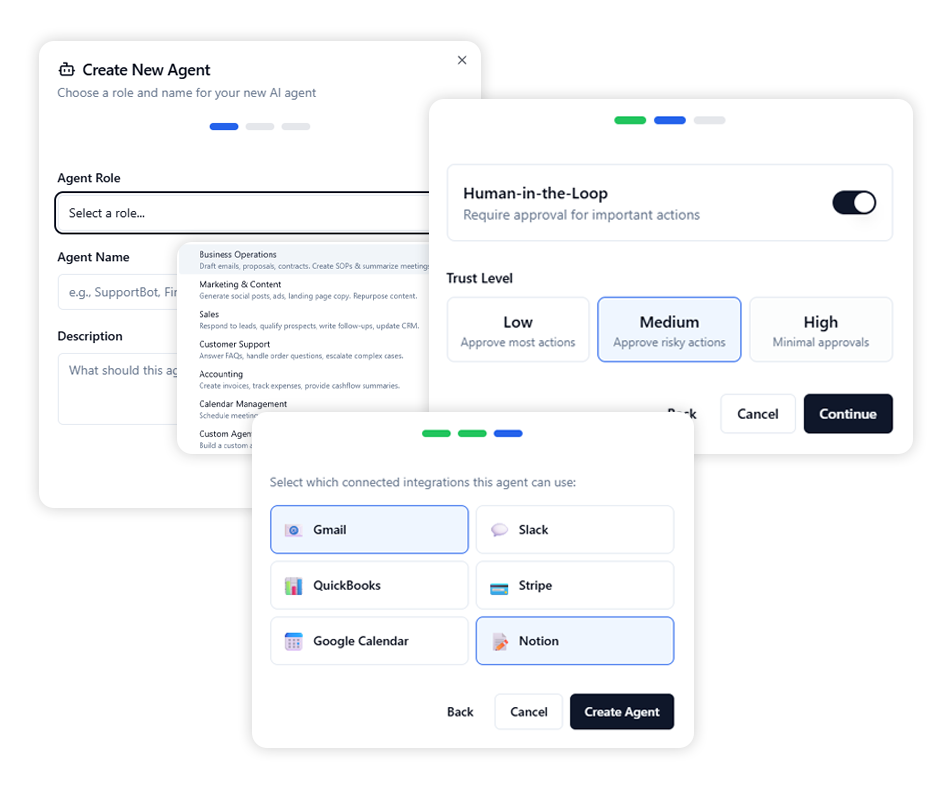
Setting up automation systems is often complicated for non-technical users. The platform simplifies this process through a multi-step agent creation flow.
Users can:
Select a predefined agent role (Sales, Customer Support, Marketing, etc.)
Assign a name and description to define the agent’s responsibilities
Configure trust levels and approval requirements
Connect the tools the agent will use to perform tasks
This structured setup process ensures users can deploy AI agents without needing technical automation knowledge.
Task Monitoring & Management
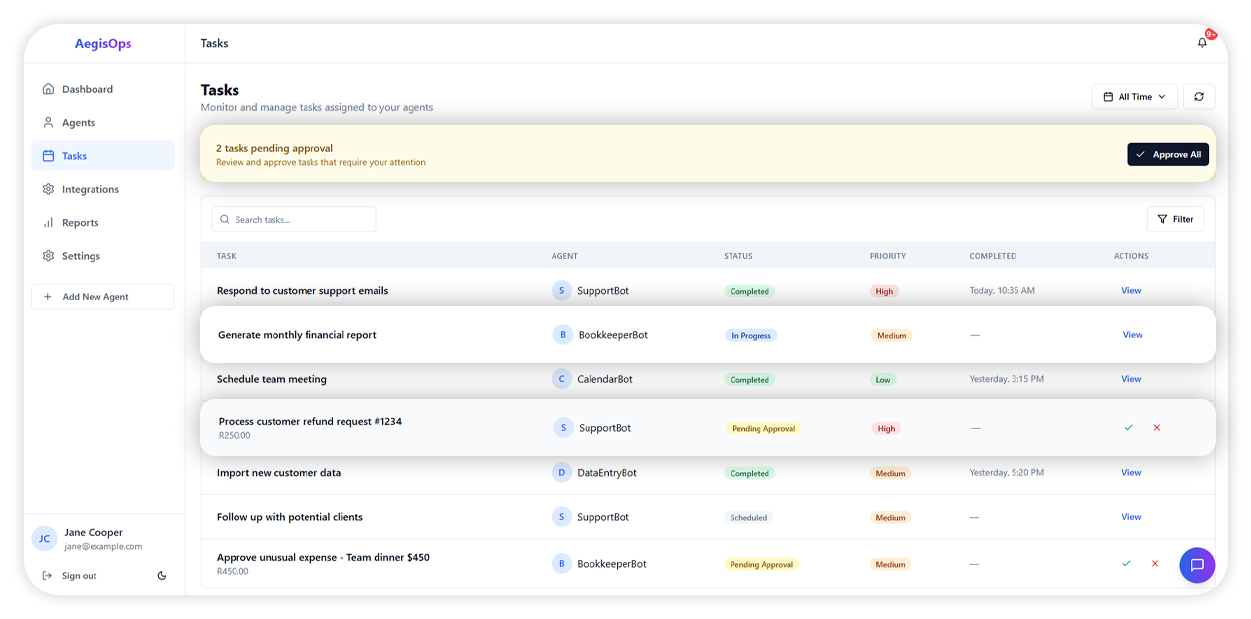
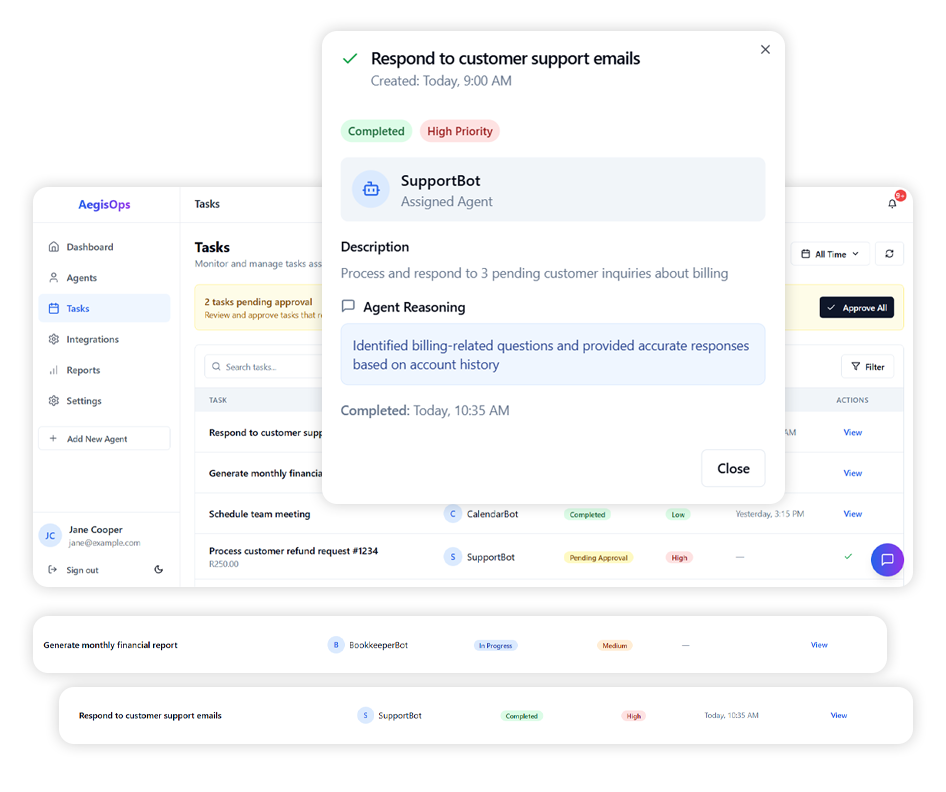
Once agents begin performing tasks, users need a clear way to monitor progress and track outcomes. The Tasks Dashboard provides a centralized view of all activities performed by AI agents.
Users can:
View tasks by status (Completed, In Progress, Pending Approval, Scheduled)
Monitor task priority levels (High, Medium, Low)
Review which agent executed each task
Approve or reject tasks that require human confirmation
This ensures businesses maintain full visibility into automated operations.
Human-in-the-Loop Control
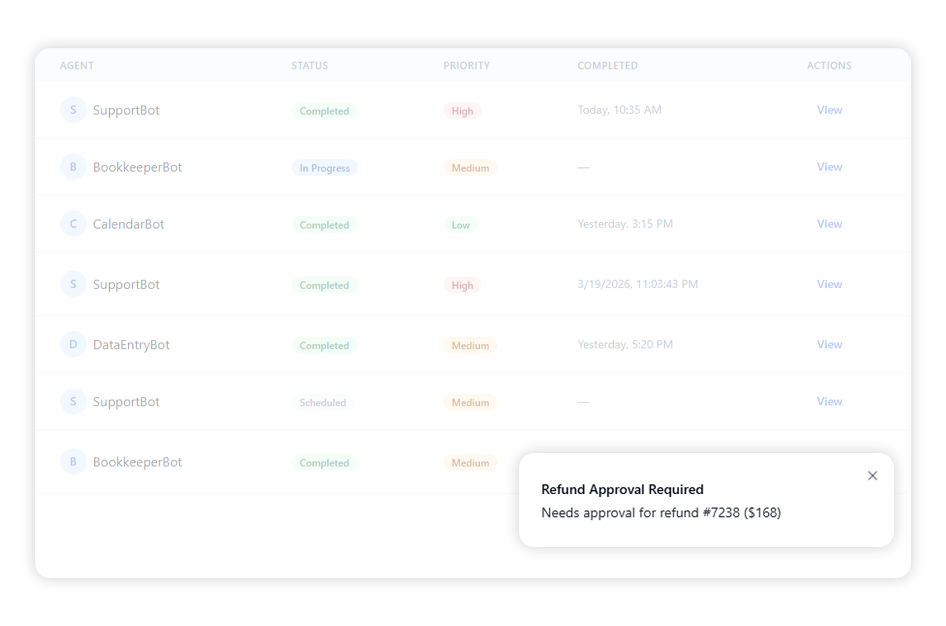
Automation systems must balance efficiency with oversight to prevent risky decisions. The platform includes a Human-in-the-Loop approval system that allows users to review sensitive actions before they are executed.
Users can:
Enable approval requirements for important actions
Adjust trust levels for different agents
Review tasks awaiting approval directly from the dashboard
Receive notifications when human input is required
This approach helps organizations maintain control while still benefiting from AI automation.
Integrations Hub
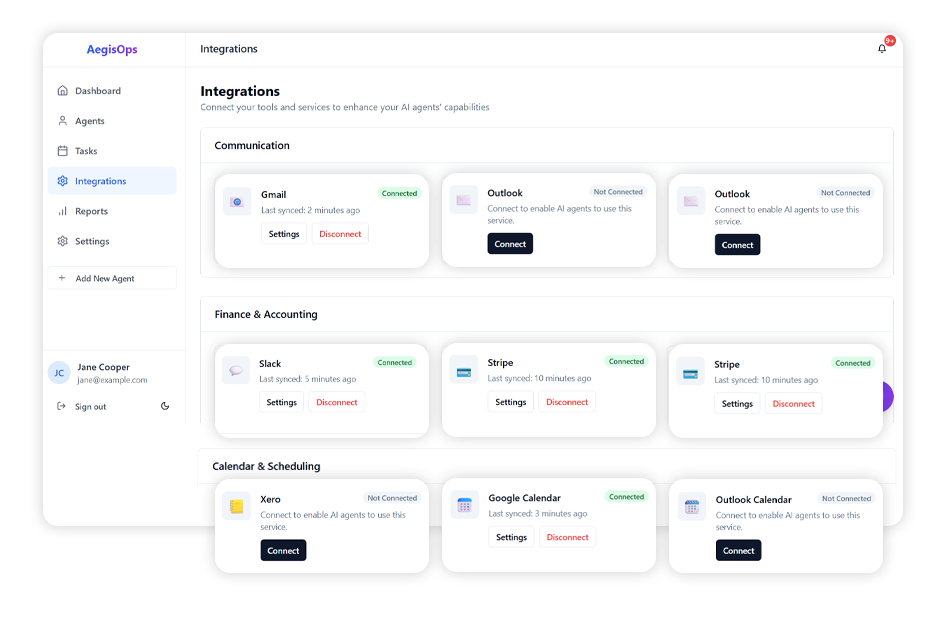
AI agents need access to existing business tools in order to perform real work. The Integrations Hub allows users to connect external services that agents can interact with.
Users can:
Connect communication tools such as Gmail and Slack
Integrate finance platforms like QuickBooks and Stripe
Link scheduling tools such as Google Calendar and Calendly
Access productivity tools like Google Drive and Notion
These integrations enable agents to perform real operational tasks across business systems.
AI Command Center Assistant
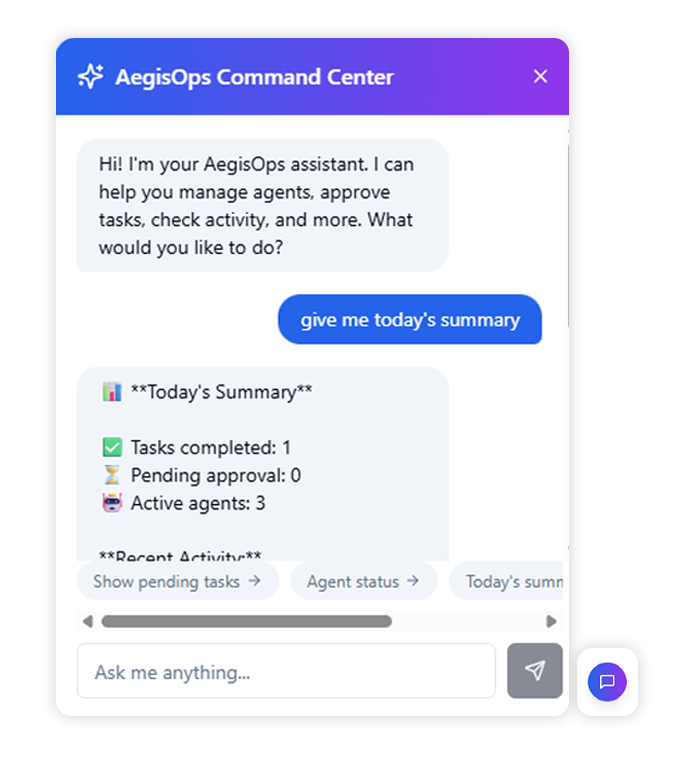
Managing multiple AI agents and tasks can become complex, especially as automation increases across different business operations. To simplify interaction with the system, AegisOps includes an AI Command Center assistant that allows users to manage the platform through a conversational interface.
Users can:
Ask the assistant to show pending tasks that require approval
Check the status of active AI agents
Review summaries of tasks completed during the day
Monitor alerts or escalations that require attention
This conversational interface reduces navigation friction and helps users quickly access important operational insights, making the platform easier to manage as the number of agents and automated tasks grows.
Usability Testing
To evaluate the effectiveness of the interface and identify usability issues, moderated usability testing sessions were conducted with participants who regularly rely on public transportation.
A task-based moderated usability testing approach was used. Participants were asked to complete realistic commuting tasks using the prototype while thinking aloud about their actions and decisions.
Methodology used:
Moderated remote usability testing
Task-based testing scenarios
Think-aloud protocol
Post-test feedback interviews
Observation of user behavior
Participants
13 participants were recruited, all with experience in managing business operations or using digital tools. Participant mix included:
8 Small business owners
2 Operations managers
3 Marketing and sales professionals
This mix ensured insights from both strategic decision-makers and hands-on users of automation tools.
Testing Tasks
Participants were asked to complete the following tasks:
Creating and configuring a new AI agent
Connecting integrations like Gmail or Slack
Reviewing and approving pending tasks
Monitoring agent activity and performance
Checking notifications and responding to alerts
These tasks reflected real-world scenarios users would encounter when setting up and managing AI-driven operations.
Key Usability Findings
Most participants were able to create an AI agent without assistance. The step-by-step setup (role selection, configuration, integrations) made the process feel guided and reduced overwhelm, especially for non-technical users.
Participants quickly understood the status of their operations through the dashboard. Metrics like active agents, pending tasks, and recent activity helped users immediately identify what needed attention.
The approval system reassured users when dealing with sensitive actions. Participants expressed greater confidence in the platform knowing they could review and control important decisions made by AI agents.
Participants appreciated being able to see exactly what each agent had done. The activity logs helped users understand AI behavior and increased overall trust in the system.
Some users needed a moment to understand what an “AI agent” represents. Once they saw examples (Sales, Support, Accounting), the concept became clearer, suggesting a need for stronger onboarding or guidance.
Expected Impact
50%
reduction
in time spent on repetitive operational tasks
2x
increase
in overall task completion through AI automation
60%
improvement
in user trust due to transparency and approval controls
40%
reduction
in missed or delayed critical actions through notifications and alerts
Reflection & Learnings
Designing an AI operations platform highlighted the importance of balancing automation power with human trust. While businesses are eager to adopt AI solutions, they need clear visibility into what automation systems are doing.
The most important insight was that successful AI tools must feel collaborative rather than autonomous. Users should feel like they are managing a team of digital assistants rather than surrendering control to a black-box system.
Prototype Notice: This project is a functional prototype and is not connected to a live database. Any sign-up or login forms are for demonstration purposes only—you can enter any email and password to explore the interface. No information you provide will be authenticated or stored.